はじめに
SSM Session Manager でポートフォワードができるようになったそうなので、表題のことを試してみます。
環境
ローカルマシン
Windows 10 です。
> Get-WmiObject Win32_OperatingSystem


SystemDirectory : C:\WINDOWS\system32
Organization    :
BuildNumber     : 18362
RegisteredUser  : Windows ユーザー
SerialNumber    : 00330-51554-55623-AAOEM
Version         : 10.0.18362
> $PSVersionTable.PSVersion
Major  Minor  Build  Revision
-----  -----  -----  --------
5      1      18362  145

> (Get-Module AWSPowerShell).Version
Major  Minor  Build  Revision
-----  -----  -----  --------
3      3      509    0
AWS Tools for PowerShell の Credential 設定
> Set-AWSCredential -AccessKey ************ -SecretKey ************* -StoreAs default
> Initialize-AWSDefaultConfiguration -ProfileName default -Region ap-northeast-1
後述しますが、設定したはいいものの AWS Tools for PowerShell は使いませんでした。
接続先のEC2
- Windows Server 2016
- SSM Agent 2.3.714.0
- 2.3.672.0 以降であることが必須要件
- バージョンが低い場合は Run Command から
AWS-UpdateSSMAgentが便利
- バージョンが低い場合は Run Command から
- 2.3.672.0 以降であることが必須要件
# AWS-UpdateSSMAgent 実行時のログ

Updating amazon-ssm-agent from 2.3.539.0 to latest
Successfully downloaded https://s3.ap-northeast-1.amazonaws.com/amazon-ssm-ap-northeast-1/ssm-agent-manifest.json
Successfully downloaded https://s3.ap-northeast-1.amazonaws.com/amazon-ssm-ap-northeast-1/amazon-ssm-agent-updater/2.3.714.0/amazon-ssm-agent-updater-windows-amd64.zip
Successfully downloaded https://s3.ap-northeast-1.amazonaws.com/amazon-ssm-ap-northeast-1/amazon-ssm-agent/2.3.539.0/amazon-ssm-agent-windows-amd64.zip
Successfully downloaded https://s3.ap-northeast-1.amazonaws.com/amazon-ssm-ap-northeast-1/amazon-ssm-agent/2.3.714.0/amazon-ssm-agent-windows-amd64.zip
Initiating amazon-ssm-agent update to 2.3.714.0
amazon-ssm-agent updated successfully to 2.3.714.0
- Systems Manager 画面の Managed Instances 一覧にいれば OK
Session Manager Plugin のインストール
PowerShell でインストーラーをダウンロードし、起動する。
> invoke-webrequest -uri https://s3.amazonaws.com/session-manager-downloads/plugin/latest/windows/SessionManagerPluginSetup.exe -outfile SessionManagerPluginSetup.exe

> .\SessionManagerPluginSetup.exe
ウィザードが開くので普通にインストールする。
一度ターミナルを再起動し、 session-manager-plugin.exe にパスが通っていることを確認する。
> session-manager-plugin.exe

The Session Manager plugin was installed successfully. Use the AWS CLI to start a session.
ポートフォワードセッションの確立
AWS Tools for PowerShell を使います。
> Start-SSMSession -Target "i-************" -DocumentName "AWS-StartPortForwardingSession" -Parameter @{ 'portNumber' = "3389"; "localPortNumber" = "56789" }
Start-SSMSession : i-*********** is not connected. と怒られる。 WSL の AWSCLI からは aws ssm start-session できたので、EC2 問題なさそう。
公式によると Start-SSMSession is not currently supported by AWS Tools for PowerShell on Windows local machines. とのこと。
かなしい。
https://docs.aws.amazon.com/systems-manager/latest/APIReference/API_StartSession.htmldocs.aws.amazon.com
仕方ないので AWSCLI にします。
AWSCLI セットアップ
chocolatey インストール
> Set-ExecutionPolicy Bypass -Scope Process -Force; iex ((New-Object System.Net.WebClient).DownloadString('https://chocolatey.org/install.ps1'))
Pythonインストール
chocolatey からインストールします。
> choco install python -y
> python -V
Python 3.7.3
AWSCLI インストール
pip からインストールします。
> pip install awscli
Credential の設定
~\.aws\credential と ~\.aws\config によしなに設定します
# .aws/credential
[default]
aws_access_key_id = ******************
aws_secret_access_key = **********************
# .aws/config
[default]
region = ap-northeast-1
ポートフォワードセッションの確立(リベンジ)
> aws ssm start-session --target i-04cc97356f6474cf3 --document-name AWS-StartPortForwardingSession --parameters "portNumber=3389,localPortNumber=56789"

Starting session with SessionId: *******-****************
Port 56789 opened for sessionId *******-****************.
どうやらうまくいった模様。
いざRDP
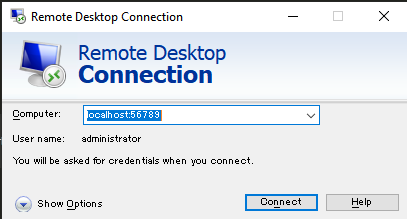
localhost:56789 に対して RDP します。

どうやらつながったようです。
今回はサーバーローカルの Administrator が生きているので、パスワードを入力してみます。

ログインできました。
おわり
PowerShell でもできるようになってほしいですね!
おまけ
コマンドを書くのがだるくなったので、指定した Name タグの EC2 インスタンスに対して StartPortForwardingSession する ps1 を作りました。
